Tag: Custom Audience

  • How to Bring Your Offline Customers Online with Facebook Advanced Matching

    screen-shot-2016-09-07-at-4-43-46-pm

    Facebook continues to roll along towards it’s goal of being omniscient by identifying more and more layers of audiences for marketers to target. With the recent updates to the Custom Audience Interface for Advanced Matching, Facebook makes it possible to target a custom audience even more accurately than before.

    In the past, when Custom Audiences were first introduced you needed to have a customer email address and then hope it matched up with the email address they used on their Facebook account. Unsurprisingly the match rate wasn’t incredibly high. Then Facebook introduced phone number matching, which helped a bit. But now with the Advanced Matching update you can use those data points plus, first and last names, DOB, gender, zip and more.

    Now while on the surface this may not seem that exciting, but just imagine some of the possibilities for certain campaign types. Facebook even says it itself:

    “With this update, you will be able to leverage the offline customer data you have (e.g. direct mail data, voter file) to find your most valuable customers on Facebook.”

    So if you were running a political campaign and knew exactly who your voter base was, you could upload that file and hit those exact people on Facebook rather than relying on demos and interest targeting! Or even using that offline voter information to target users on Facebook with Lead Ads to gather more info to add to your other marketing platforms like an email list. Round and round we go. This could help politicians drive much higher lift, brand recall and ultimately improve sentiment rating if they’re hitting their offline users with a specifically targeted message on Facebook to the same audience.

    You could also use this feature to provide air support for any traditional marketing you’re running. So if you’re running a direct mail campaign, use that same data you have and apply it to Facebook to hit the same users, at a much higher match rate, to provide that digital support for your traditional campaign. Currently, Facebook says from early tests, clients have been able to match 54% of their offline customer base. Not too shabby.

    “By reaching your offline audiences online with relevant marketing messages, you will be able drive greater success for your Facebook campaigns, while boosting the performance of your direct mail marketing via simultaneous offline and online messaging.”
  • Use the Amount of Time a User Spends on Your Site to Create a Custom Facebook Audience!

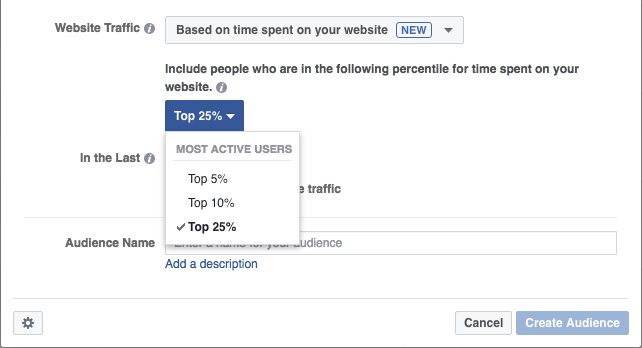
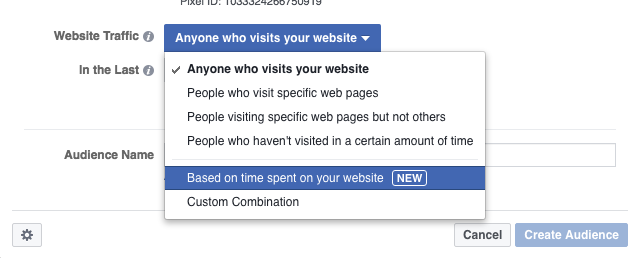
    Facebook is now offering a brand new method of creating a Custom Audience and it should excite you if you’re using landing page content to generate leads. Time Spent on Your Website is the newest method Facebook has unveiled to craft a Custom Audience! This could be huge for businesses that are driving customers to a specific landing page to learn/read/view more.

    CA4
    *Note, that this option isn’t available to all advertisers yet as Facebook usually slowly rolls new features out before they’re widely available.

    CA1CA2

    Businesses can drive users to their website and flag them for remarketing, but what good is one giant audience if it doesn’t take into account how engaged that customer actually was? Of course everyone knows this, but if your landing page is educational content that a customer may read/watch and they don’t make any additional actions on your website then you’re kind of up the creek when it comes to segmentation.

    Using this new Custom Audience segmentation though you can easily identify who actually spent the most time on your website reading/watching your content. Don’t waste any time, money or effort reengaging with users on Facebook who hit your page and bounced out or maybe stayed for a few seconds and decided they weren’t interested. Now you can actually identify the top percentiles of users based on Time Spent on Website, similar to how you can already do that with Facebook Video and percentage of a video viewed.

    CA3CA4

    CA5

    It opens doors for people producing one sheeters, white pages or any other tactic of capturing customers’ attention on a specific landing page to learn more. People may be interested, but not necessarily engaged. So identify who has devoted the most time to the content you produced and reengage. This is just the latest example of how you can narrow the funnel and sell on social.

  • Attack the Top of the Sales Funnel with Facebook Video

    attackthetopofthesalesfunnel

    Facebook rolls out new ad types all the time that allow advertisers to target users in unique ways or to reach different goals. Combining these various strategies into a few campaigns going through the longer sales funnel is one of the best ways to take advantage of all these ad types. This is what I like to call Attacking the Top of the Sales Funnel.

    Figure out who your key demo is for this campaign; who are you trying to hit? Is it men of a certain age in a certain radius? Moms with an interest in soccer? Whatever it is, set your targeting and run a Facebook video campaign.

    The beauty of Facebook video is you can sort out the users that are actually interested in your product based on who actually watched certain percentages of the video. Make sure to check off “Create audiences from people who view this video” under the designated Call To Action Button.

    Screen shot 2016-05-05 at 4.01.18 PM

    Doing this will allow Facebook to build a Custom Audience of users who have viewed your video. If your video gets 10,000 impressions, but only 5,000 users actually watch the video, then why would you want to waste ad spend on the 5,000 people that scrolled right past your content? Exactly, follow up with users who have already expressed an interest and given you their attention.

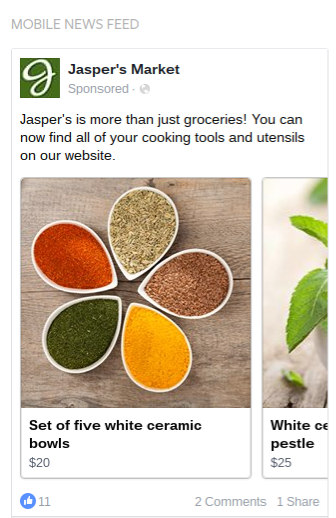
    Now it’s time to attack the top of the sales funnel. Using this Custom Audience you have created a perfect retargeting list to hit Facebook users with a follow up message or offer. This is particularly effective if the video is more of a brand awareness play and then retargeting users in the Custom Audience with a Carousel Ad with specific products/features.

    Finally, based on the results of your Carousel Ad determine which product or feature is getting the best engagement and most clicks from users? Then jump one level further down the funnel and closer to a conversion by serving up a specific offer or special to those users – based directly off which Carousel slide performed the best.

    Courtesy of Facebook for Business
    Courtesy of Facebook for Business

    This is a great tactic to increase efficiency of your ad spend. Rather than throwing videos, promo posts, website clicks ads etc. all out randomly and seeing what sticks, this allows you to methodically whittle down your audience size while also increasing the user attention, interest and the likelihood of ultimately making a purchase.

  • Understanding the Facebook Pixel

    The Facebook Pixel has helped bridge the gap in attribution for any business running certain ad types on Facebook. Taking advantage of the Pixel will allow you to track conversions, create remarketing campaigns and track how various audiences are interacting with your site. It’s important to install the Facebook Pixel sooner than later as the old Facebook conversion tracking codes will be getting deactivated by Facebook in the second half of 2016 so it’s necessary to have all clients over to the new Facebook pixel by the summer of 2016.

    The Basics

    • The “Standard Objectives” that can be set in the pixel (Lead, Complete Registration etc.) are the 9 most requested actions.
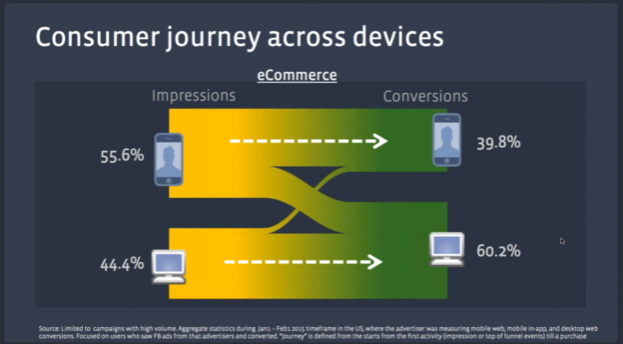
    • Pixel improves cross-device tracking based on the user’s Facebook identity across desktop and mobile
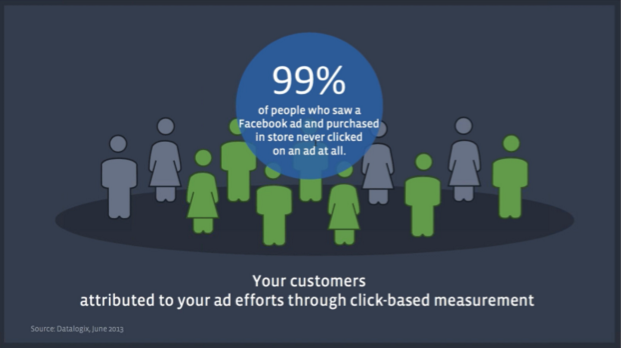
    • 99% of people who saw a Facebook ad and purchased in-store never clicked on an ad at all.


    Facebook_Pixel1

    Difference in Conversion Tracking Options

    • Standard Events: These are best when you want to pass back data (which action was performed on the site), when utilizing dynamic product ads and dynamic values for products, and ideal when access to the website’s back-end code is available.
      • Standard Events tracking is a stronger method of tracking conversions than Custom Conversion, so use this before Custom Conversions when possible.
        • In Page Event Tracking — Used when a person submits a form but a new page URL doesn’t load. “Standard events are going to be the best way to track that event if there is no specific URL you can use to create a rule.”
    • Custom Conversions: The best advantage of Custom Conversions are that they don’t need to have additional code added to the client’s website (other than the standard Facebook pixel), and allows for tracking of up to 20 separate conversions. This is great for when access to the client’s website back-end is unavailable. Custom Conversions can also be used to track users through the conversion funnel using the specific landing page URLs.
      • For example if you have your Facebook pixel placed on a client’s website and then in the future need to change conversion parameters or add new conversions, this allows you to track this by creating Custom Conversions which use the main Facebook Pixel and track based on the URL or a piece of the URL (i.e. Thank You page) as well as the category (ie. “purchase”). “It is a simple way to define new types of conversions.”


    Examples of Uses for the Pixel

    • A college website wants to drive leads for people that wanted more info specifically on getting a Master’s Degree. Create a parameter that is a “Content Type” for the Master’s option, so that will say to Facebook this is a specific event (Master’s Degree) and allow Facebook to segment out this info specifically rather than tracking all leads as one conversion.
    • Add Standard Event tracking to a specific button on the website, which is great for a form fill or a client that doesn’t have a Thank You page to support conversion tracking. This involves a bit of a workaround, which is broken down in the Facebook Developers How To.


    How to Make Sure the Facebook Pixel is Live

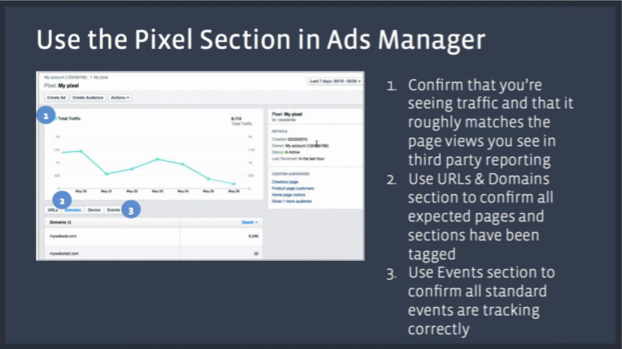
    • To double check if a Facebook Pixel is working, there is a tool called the Facebook Pixel Helper that is a Google Chrome widget, which can be used to check to see if there are any pixels on a specific page and if it is working. This is a widget I use all the time to check in on code installations quickly and easily, definitely recommend it.

    Facebook_Pixel2

    Cross Device Conversions

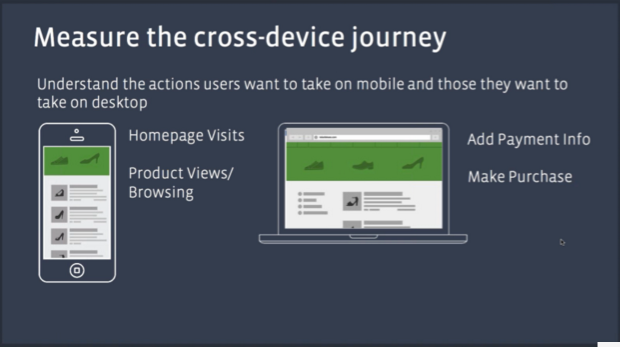
    • A great experiment to run is to explore running mobile specific campaigns aimed at getting people to your website/driving brand awareness and running desktop specific campaigns aimed at driving people to pages for adding payment info and completing conversions.
      • Go into cross-device reports to see how much traffic and how many conversions are coming from which devices and go from there.

    Facebook_Pixel3

    Facebook_Pixel4


    Taking Advantage of the Purchase Funnel (when available)

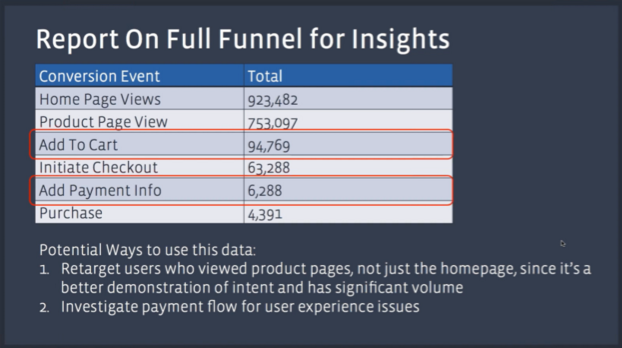
    • Move Optimization Event Up the Funnel — Rather than giving Facebook, say 200 pieces of data from final conversions to optimize a campaign, try moving the Optimization Event up to the initial checkout page where Facebook will now have, say 2,000 pieces of data to optimize for.

    Facebook_Pixel5

    Facebook_Pixel6

    Segment Audiences Based on Site Usage

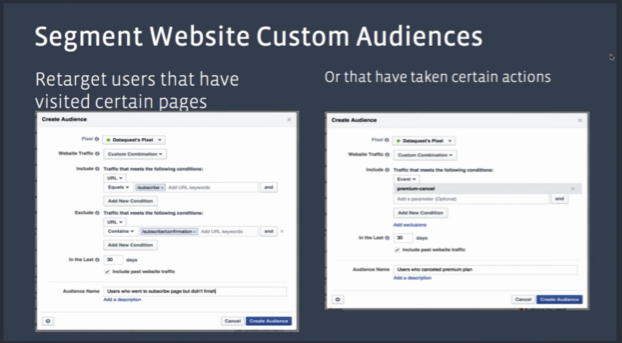
    • Segment Audiences based on how users interact with a website using 2 main options:
      • How Interested Are They and How Long Ago Did They Visit?
        • Someone who visited the website 1 day ago and did a search but did not add anything to their cart; try setting up a basic remarketing campaign, but if that audience doesn’t convert in another week or so they may not be worth it.
        • Someone who visited the website 7 days ago and made a high value purchase; create a Lookalike Audience of these users while also remarketing with additional complimentary products/items.
        • Someone who visited 30 days ago and is a member but has not returned, hit them with a re-engagement message (specific offer, promotion etc.), but they may be more likely to lapse as a customer.

    Facebook_Pixel7

    Facebook_Pixel8

    Graphics and stats courtesy of Facebook. For a deeper dive, you can watch the Facebook Pixel Webinar here.