The 5 Ways to Maximize Your Marketing Amidst Customers’ Privacy Concerns

Digital marketing is not the shiny new object it was a decade ago, but is still a crucial piece of any business’ tool kit. Privacy concerns from users have pushed tech giants like Meta, Google, Apple and others to adopt stricter security features, making it more difficult for user activity to be tracked online thus providing a conundrum for marketers.

That is great news for the consumer who is wary of one too many oddly specific and prescient ad placements. It’s not as welcome news for marketing professionals who have poured millions of dollars into digital because of how granular they could get with ad targeting and the detailed reporting that followed.

Apple introduced App Tracking Transparency in 2021, an explicit opt out option presented to iPhone users regarding in-app activity tracking, which threw a wrench into many marketer’s digital strategies because it fundamentally altered how campaigns on platforms like Facebook and Instagram were run. Facebook itself has claimed the iOS privacy change will cost them $10 Billion in 2022 alone.  

Just a few years ago a marketer could target a hundred people on Facebook and track 10 definitive conversions from that original audience. Over time Facebook increased the minimum size of a custom audience that one could create with externally uploaded information (i.e. email lists) due to data scraping concerns. The nexus event of these privacy concerns originate from the disaster that was Cambridge Analytica

News stories like that, the trend of social media algorithms favoring sensational and engaging content above all else, and even Congressional hearings, have led to public pushback, putting tech giants on their heels forcing them to adapt. 

Marketers, as is their nature, were forced to do the same.  

So now with the privacy and security concerns of users leading to changes made by the platforms in response, the easy days are a thing of the past. 

That doesn’t mean that digital marketing is any less effective though. It just means every business needs to go beyond just the numbers of what the CPA is on this creative targeting that audience vs another. 

Here are the Top 5 Ways to Maximize Your Marketing Amidst Customers’ Privacy Concerns

1.) Influencer Marketing 

The effectiveness of Influencer Marketing lies in the ability to partner with a personality that consumers already trust and admire. Partnering with creators allows a brand to go beyond direct marketing and provides a warm referral. Facebook has recently doubled down on Influencer Marketing with a full Creator Marketplace for marketers to find and work with top talent.

It’s not just a buzzword marketing tactic either, the numbers back it up

“Research from Meta for Business in 2020 found that 84% of global consumers say they would purchase, try or recommend a product based on influencer content if it is relevant.

Influencer marketing is especially powerful in driving sales when paired with other ads. Facebook and Instagram campaigns that combined regular ads and influencer ads are 85%3 more likely to drive people to add products to shopping carts, compared with using regular ads alone, according to 2021 Meta for Business research…For brands, the most effective influencers to partner with are those seen as authentic, trustworthy and relatable by their audiences. In fact, 60% of global consumers say they’d follow a brand, product or service after seeing it promoted by a creator who shares their values and interests.

2.) Put a Face to Your Brand

It’s incredibly rare for a brand to build sustainable success through advertising alone. It takes branding and marketing to drive awareness and make people familiar with what a business is offering. Putting a face to your brand helps create a connection, build a community and a sense of trust, but most importantly it arouses emotion.

“Emotions drive people to action. They make us laugh, shout, and cry, and they make us talk, share, and buy.” – Contagious: Why Things Catch On

3.) You Have to Give Before You Can Ask

In the era of privacy concerns online, trust takes time to build between brand and consumer. It’s important to understand that you can’t always be looking to sell, especially not in the first interaction with a user. Provide content that’s meaningful, educational, informative, and entertaining. Connect with your target audience and build a tribe of users that want to be associated with your brand. Provide more than you ask for so when you do go for the ask, users are ready, willing, and able.

4.) Differentiate Your Content

Too many brands create one piece of content and then share the same exact thing on Facebook, Instagram, Twitter, LinkedIn etc. It isn’t just a recommendation anymore, it is vital to differentiate your content. 

Give people a reason to follow and engage with you on different platforms or you run the risk of siloing your audiences. Create native content for each platform in order to reach the user where they are, but more importantly reach them with content that speaks to the behavior of the specific platform.

5.) Become More Than Transactional. 

Provide value beyond just the product you hope to sell if you want to build a lasting relationship with customers. For a brick and mortar business that might mean selling coffee in the morning to reach customers at different times of the day while eliciting different behaviors. 

Another example of becoming more than transactional is the renowned customer service of e-commerce pet retailer Chewy. With big box stores, Amazon, and local pet stores it’s difficult to cut through the white noise when many customers are just comparing prices. Chewy became more than transactional with its personal touch in customer service.

With articles appearing on the likes of Fortune and the Today Show, the customer service interactions of Chewy include not just refunds, but handwritten notes and even flowers delivered to customer’s doors.

Customers will remember you and more importantly talk about you if the relationship becomes more than a transaction.
Lower the Barrier of Entry to Drive More Conversions

Currently the average conversion on mobile takes 24 taps. This is why it is crucial to lower the barrier of entry to complete a conversion, whether that be an e-commerce purchase, a sign-up or a form fill. Making things simpler and quicker for your consumers will help improve conversion rates and total conversions. Whether it’s eliminating unnecessary steps in a shopping cart checkout process or enabling users to check out as guests, the easier the process is, the more likely consumers are to complete the desired action.

If form fills to gather customer information is your goal, consider running a Facebook Lead Ad as it definitely lowers the barrier of entry. Rather than displaying an ad, requiring a click, sending a user to your website, waiting for it to load, manually filling out a form and then submitting it — a Lead Ad is a Two Tap process.

Originally created as a quick way to optimize form fills for mobile users, these ads have a person click once on the ad, which will automatically fill various fields in the form based on information from their Facebook profile, and then a second click to approve and send this info to the advertiser. And with the ability to integrate these Lead Ads with CRM systems like Salesforce, this eliminates the need for a lengthy process and helps quickly grab the relevant information advertisers crave.

Micro Moments: Be Present, Be Personal, Be Persuasive

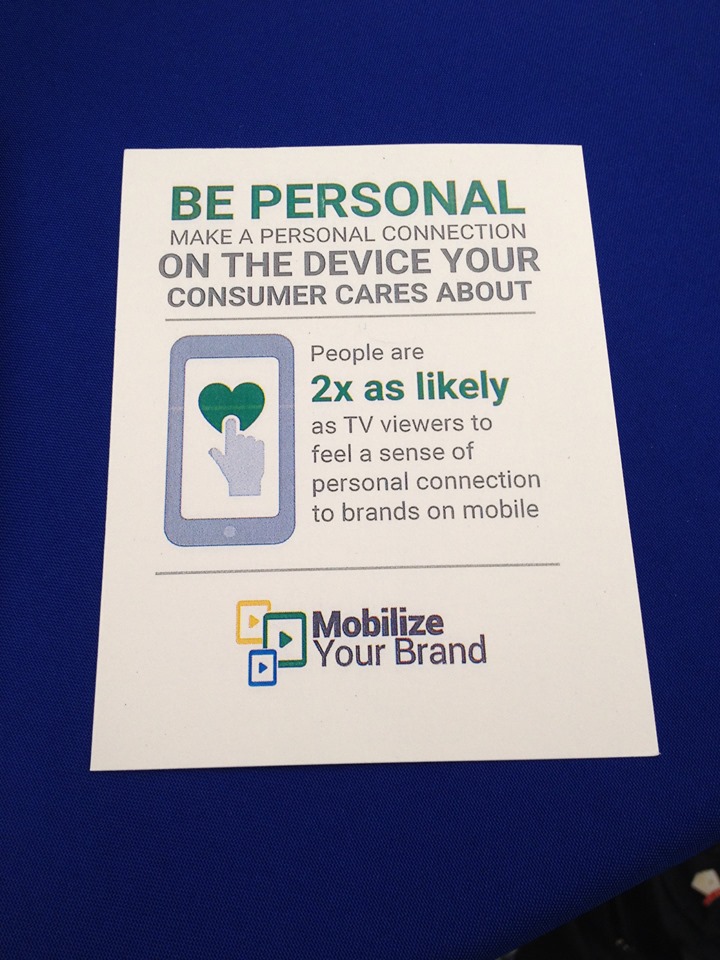
“People are 2x as likely to feel a personal connection to brands on mobile.”

Micro Moments  are changing the way users are searching, particularly in mobile. With the omnipresence of smartphones, users are able to search for anything when an impulse strikes, creating these “I Want to Learn, I Want to Find, I Want to Do, I Want to Buy” moments. Taking advantage of the omnipresence of mobile, users decide on the fly what they want to look up, research and purchase in the spur of the moment.

These Micro Moments create a demand for relevance, which establishes a higher level of expectations.

“When we act on our needs in-the-moment, our expectations are high and our patience is low. This makes the quality, relevance, and usefulness of marketing more important than ever.” – Think With Google

google_mobile

  • Be Present, Be Personal, Be Persuasive
    • In mobile it’s all about serving the right message to the right person at the right time. Crafting a highly relevant message, that is present at the right time and optimized for the channel and device will win.
  • ⅓ of mobile usage occurs in the home so we aren’t necessarily targeting someone “on-the-go” which is why Cross Device Conversions become such a huge metric.
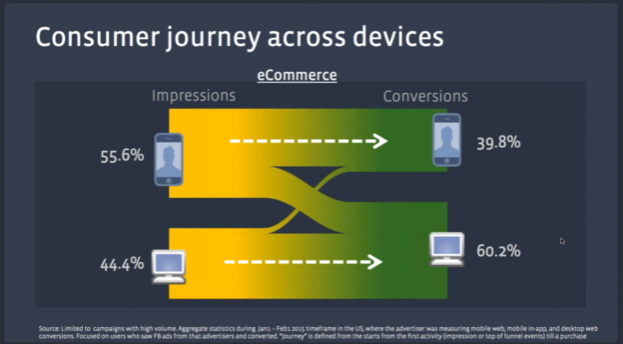
    • Cross Device Conversions help campaigns follow the users along the path to a conversion, regardless of where they started. If a user has a Micro Moment, performs a mobile search to learn more, but then converts later via desktop, without tracking Cross Device, we would not be able to properly attribute that.

Facebook Bidding Strategies: Engagement vs CPM vs CPC

As Facebook continues to develop new ad types, selecting the right bidding strategy for each becomes even more critical. This slight adjustment in bidding strategy, whether bidding for Engagement, CPM, CPC etc. will have a huge impact on ad performance. So instead of defaulting to running a Promoted Post simply because it reaches a large number of people, it’s important to identify what the goals of an ad campaign are and act accordingly.

A lot of times people will run Promoted Posts for sale offers and simply bid on Post Engagement (it’s the default option), which will optimize ad delivery for people most likely to engage with the post. The only problem is that this doesn’t necessarily correlate with sales as it will optimize to display ads to users most likely to comment, like, share etc. Facebook reps describe these as “clicky” users, who are more likely to comment, like or share, but not necessarily hit your website and make a purchase.


Below are a few quick tips for your Facebook ad campaigns, depending on the goal of the ad:

Goal: Reach a large number of users and drive Impressions

Ad Type: Promoted Post

Bid Strategy: CPM or Daily Unique Reach/Reach & Frequency (if you’re concerned with delivery/frequency) to blast the ad out


Goal: Clicks to a Website

Ad Type: Website Clicks

Bid Strategy: CPC ­ optimized for Link Clicks

*Note: If the audience size isn’t that large you can bid on CPC and optimize for Impressions, but Link Clicks will be the most effective way of driving results if applicable.


”Engagement doesn’t necessarily correlate to sales anymore.”

  • As with most things, take this with a grain of salt, but the underlying point here is that bidding on Post Engagement may not be the most effective way to drive sales. Think of it this way, if bidding on engagement you’re telling Facebook to bid on users most likely to like, comment and share where in the end what you ultimately want is people to go to the website and convert/make a purchase instead. So a Website Clicks campaign makes more sense for specific sales/offers.
    Using the Best Bid Strategy w/ Each Ad Objective
  • A Promoted Post bidding on Post Engagement would be more effective bidding for CPM if your goal is brand awareness/getting the ad in front of as many people as possible, not necessarily bidding for users who will engage on the post itself.
  • Promoted posts probably should not be used if the campaign goal is to get people to click through to the website, unless you are altering the bid strategy on that campaign to CPC (specifically Link Clicks)
  • “90% of offline sales come from people who don’t interact with the ads (likes, comments etc.)”
  • *Note: If you’re still using the old Facebook conversion tracking code, the best practice is to place the new Facebook pixel on the client website and give it 30 days to build data before switching from the old code to the new pixel.


Reporting Facebook Conversions (Accurately)

Confused by your conversion data on Facebook? Seeing data trickle in or maybe conversions are missing from your insights? Facebook reports all conversions as a “Conversion,” whether it’s a View Through Conversion or a Direct Conversion; Facebook does not differentiate like Google does. So that’s why it’s important to set the “Attribution Window” appropriately and leave yourself the right amount of time if trying to match up conversions with Google Analytics or a client’s CRM data. 

How Facebook Defines Conversions:

Facebook bundles everything into the one “Conversion” metric. The default attribution model is this:

– User Viewed Ad and Converted Within 1 Day

– User Clicked Ad and Converted Within 28 Days

To adjust this, go to your Ads Manager, click on “Columns” and select “Customize Columns.”

Facebook Customize Columns


In the bottom right hand side of this menu you will see what the Attribution Window is currently set to with the option to adjust it.

Facebook Attribution Window


Set your Attribution Window appropriately, give the campaigns the same amount of time to sync up with your Analytics or client back-end system and your reporting headaches should be gone!

Understanding the Facebook Pixel

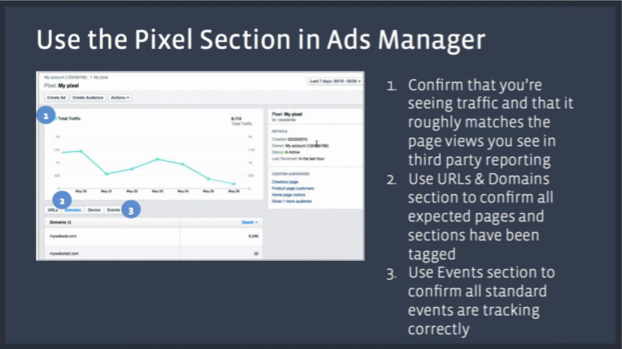
The Facebook Pixel has helped bridge the gap in attribution for any business running certain ad types on Facebook. Taking advantage of the Pixel will allow you to track conversions, create remarketing campaigns and track how various audiences are interacting with your site. It’s important to install the Facebook Pixel sooner than later as the old Facebook conversion tracking codes will be getting deactivated by Facebook in the second half of 2016 so it’s necessary to have all clients over to the new Facebook pixel by the summer of 2016.

The Basics

  • The “Standard Objectives” that can be set in the pixel (Lead, Complete Registration etc.) are the 9 most requested actions.
  • Pixel improves cross-device tracking based on the user’s Facebook identity across desktop and mobile
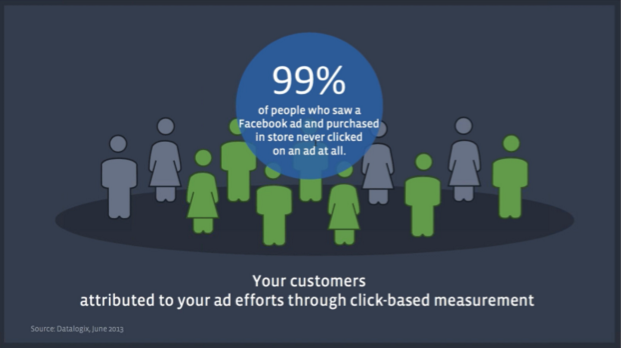
  • 99% of people who saw a Facebook ad and purchased in-store never clicked on an ad at all.


Facebook_Pixel1

Difference in Conversion Tracking Options

  • Standard Events: These are best when you want to pass back data (which action was performed on the site), when utilizing dynamic product ads and dynamic values for products, and ideal when access to the website’s back-end code is available.
    • Standard Events tracking is a stronger method of tracking conversions than Custom Conversion, so use this before Custom Conversions when possible.
      • In Page Event Tracking — Used when a person submits a form but a new page URL doesn’t load. “Standard events are going to be the best way to track that event if there is no specific URL you can use to create a rule.”
  • Custom Conversions: The best advantage of Custom Conversions are that they don’t need to have additional code added to the client’s website (other than the standard Facebook pixel), and allows for tracking of up to 20 separate conversions. This is great for when access to the client’s website back-end is unavailable. Custom Conversions can also be used to track users through the conversion funnel using the specific landing page URLs.
    • For example if you have your Facebook pixel placed on a client’s website and then in the future need to change conversion parameters or add new conversions, this allows you to track this by creating Custom Conversions which use the main Facebook Pixel and track based on the URL or a piece of the URL (i.e. Thank You page) as well as the category (ie. “purchase”). “It is a simple way to define new types of conversions.”


Examples of Uses for the Pixel

  • A college website wants to drive leads for people that wanted more info specifically on getting a Master’s Degree. Create a parameter that is a “Content Type” for the Master’s option, so that will say to Facebook this is a specific event (Master’s Degree) and allow Facebook to segment out this info specifically rather than tracking all leads as one conversion.
  • Add Standard Event tracking to a specific button on the website, which is great for a form fill or a client that doesn’t have a Thank You page to support conversion tracking. This involves a bit of a workaround, which is broken down in the Facebook Developers How To.


How to Make Sure the Facebook Pixel is Live

  • To double check if a Facebook Pixel is working, there is a tool called the Facebook Pixel Helper that is a Google Chrome widget, which can be used to check to see if there are any pixels on a specific page and if it is working. This is a widget I use all the time to check in on code installations quickly and easily, definitely recommend it.

Facebook_Pixel2

Cross Device Conversions

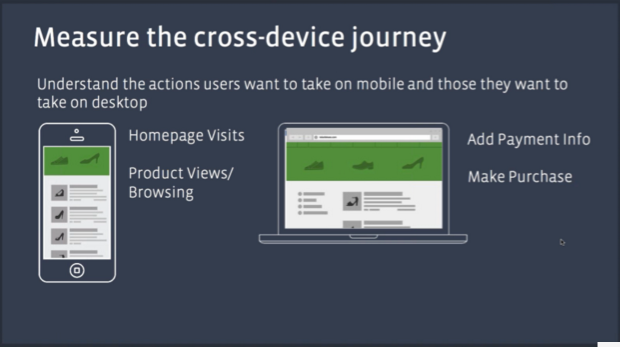
  • A great experiment to run is to explore running mobile specific campaigns aimed at getting people to your website/driving brand awareness and running desktop specific campaigns aimed at driving people to pages for adding payment info and completing conversions.
    • Go into cross-device reports to see how much traffic and how many conversions are coming from which devices and go from there.

Facebook_Pixel3

Facebook_Pixel4


Taking Advantage of the Purchase Funnel (when available)

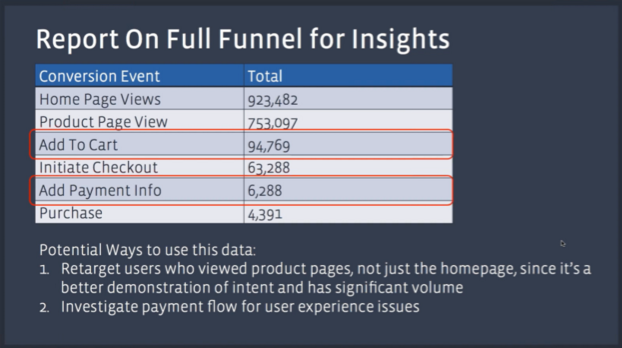
  • Move Optimization Event Up the Funnel — Rather than giving Facebook, say 200 pieces of data from final conversions to optimize a campaign, try moving the Optimization Event up to the initial checkout page where Facebook will now have, say 2,000 pieces of data to optimize for.

Facebook_Pixel5

Facebook_Pixel6

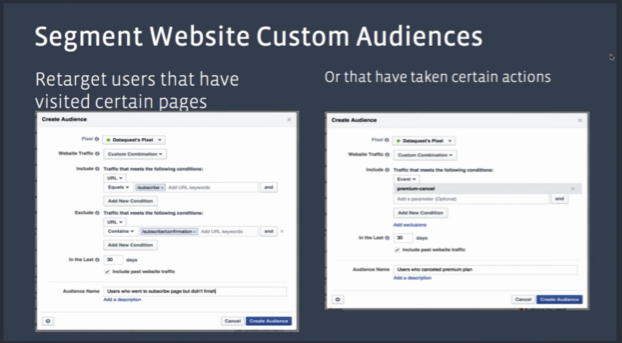
Segment Audiences Based on Site Usage

  • Segment Audiences based on how users interact with a website using 2 main options:
    • How Interested Are They and How Long Ago Did They Visit?
      • Someone who visited the website 1 day ago and did a search but did not add anything to their cart; try setting up a basic remarketing campaign, but if that audience doesn’t convert in another week or so they may not be worth it.
      • Someone who visited the website 7 days ago and made a high value purchase; create a Lookalike Audience of these users while also remarketing with additional complimentary products/items.
      • Someone who visited 30 days ago and is a member but has not returned, hit them with a re-engagement message (specific offer, promotion etc.), but they may be more likely to lapse as a customer.

Facebook_Pixel7

Facebook_Pixel8

Graphics and stats courtesy of Facebook. For a deeper dive, you can watch the Facebook Pixel Webinar here.