Social Content • Marketing • Brand Strategy

Red is a former journalist turned marketer with 15+ years of experience both on the agency side working with entrepreneurs to public companies, as well as in-house working with brands on marketing strategy and hands-on content creation that supercharges brands, builds community, and drives customer acquisition.

  • Use the Amount of Time a User Spends on Your Site to Create a Custom Facebook Audience!

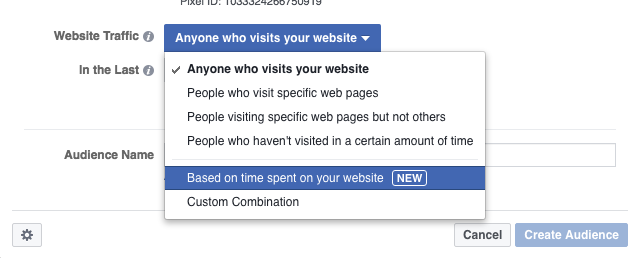
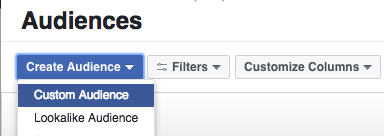
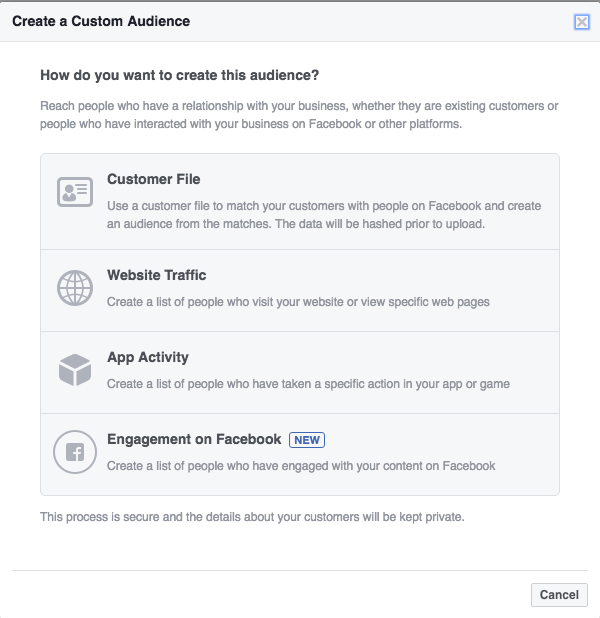
    Facebook is now offering a brand new method of creating a Custom Audience and it should excite you if you’re using landing page content to generate leads. Time Spent on Your Website is the newest method Facebook has unveiled to craft a Custom Audience! This could be huge for businesses that are driving customers to a specific landing page to learn/read/view more.

    CA4
    *Note, that this option isn’t available to all advertisers yet as Facebook usually slowly rolls new features out before they’re widely available.

    CA1CA2

    Businesses can drive users to their website and flag them for remarketing, but what good is one giant audience if it doesn’t take into account how engaged that customer actually was? Of course everyone knows this, but if your landing page is educational content that a customer may read/watch and they don’t make any additional actions on your website then you’re kind of up the creek when it comes to segmentation.

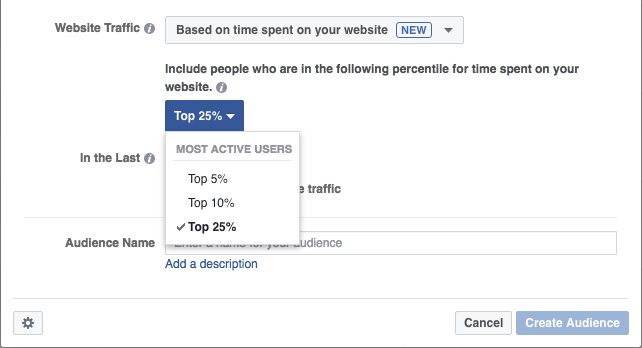
    Using this new Custom Audience segmentation though you can easily identify who actually spent the most time on your website reading/watching your content. Don’t waste any time, money or effort reengaging with users on Facebook who hit your page and bounced out or maybe stayed for a few seconds and decided they weren’t interested. Now you can actually identify the top percentiles of users based on Time Spent on Website, similar to how you can already do that with Facebook Video and percentage of a video viewed.

    CA3CA4

    CA5

    It opens doors for people producing one sheeters, white pages or any other tactic of capturing customers’ attention on a specific landing page to learn more. People may be interested, but not necessarily engaged. So identify who has devoted the most time to the content you produced and reengage. This is just the latest example of how you can narrow the funnel and sell on social.

  • Ambiguity is the Enemy of Attribution: Facebook to Roll Out Store Visits Tracking

    FBStoreVisitsTracking
    We’re getting closer to closing the loop on digital marketing. Ambiguity is the enemy of attribution. Facebook just announced it will soon begin rolling out its own Store Visits tracking functionality for ad campaigns.

    Google started the trend when it launched a very similar program nearly two years ago to track Store Visits after a user saw or clicked a business’ ad. However, this is still something that requires a very large threshold of clicks and quite frankly geographical footprint. It’s not accurate enough yet for small business owners to take advantage of. It looks like Facebook may be identifying an opportunity to strike while the iron is hot.

    Ask any digital marketer working with a brick-and-mortar business what the biggest challenge is and they will tell you attribution. I hear it all the time from clients that understand they need to run digital and social campaigns and may even acknowledge they are performing well, but what does that really mean to them? Without any real data on how much foot traffic these campaigns are driving there will always be that question mark. Unless of course you have a client where you can tie in with their in-house Point-Of-Sales (POS) system to track purchases, but that’s not always available.

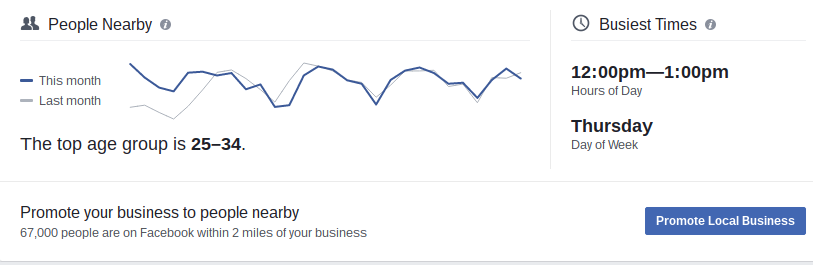
    So over the next few months Facebook will begin rolling out its own Store Visits tracking, which makes a ton of sense considering that its Local Awareness Ads are designed to drive this exact action. I think we saw the early glimpses of this with Local Insights, which can be found in your Facebook business page’s Insights and then under Local. An incredibly effective tool that can tell you loads of information about which kind of people your ads are reaching nearby your location, what their demographics are, what times are most popular etc. to help optimize your local ads. You can actually narrow the radius down to as tight as 165 feet around the location!

    Screenshot 2016-06-16 at 4.04.04 PM
    Screenshot 2016-06-16 at 4.03.56 PM
    The No. 1 biggest regret for Google in my opinion was the failure to launch of Google+. For any Store Visits tracking to work Google requires people to have their Location Tracking on their phone enabled, as does Facebook but so many more people allow it because as a social platform it provides that additional value (check-ins, local reviews etc.). If Google could have gotten G+ to take off like it hoped, combined with its treasure trove of data on user intent, they would have ran the world. So utilizing that location tracking information along with wi-fi signals, Facebook will be able to coordinate when a user sees or clicks and ad and goes within that business’ geo-fenced area.

    If you tell a client that his Local Awareness ad got 850 Clicks and drove 100 Calls he may say that’s great, but if you’re able to tell a client this campaign specifically drove 250 people directly into their store? Now that is valuable data.

    Facebook will also be rolling out the ability to connect Ads Reporting with a location’s POS system to track sales via the Offline Conversions API.

    “Advertisers now have a way to connect transactions that take place in store or over the phone to their ads. The Offline Conversions API allows businesses to match transaction data from their customer database or point-of-sale system to Ads Reporting, helping them better understand the effectiveness of their ads in real-time. Businesses can work with partners such as IBM, Index, Invoca, Lightspeed, LiveRamp, Marketo and Square or with Facebook directly.”

    Facebook says these functionalities will be rolling out to all advertisers globally in the coming months so start getting your clients prepared now.

  • Facebook Video Updates Include Split Screen; Could Be a Boon for Advertisers

    A new update to Video Ads on Facebook could be a boon for advertisers. The more and more content, ads, options that get pushed out there the less and less time and attention your stuff will get. Opportunity is constantly shrinking so it’s up to the advertiser to find new and different ways to engage the customer. We’re day trading in attention here so the key is to find out what will grab a user and what will keep them the longest because that’s going to give you the best opportunity to drive a conversion and make a sale.

    This new update to Facebook Video will essentially allow users to watch a video and click through to view your website without waiting until the video ends or having to leave Facebook at all. It opens up a split screen option so users can view your website while still watching the video in their browser, uninterrupted.

    I’m predicting this will have a huge positive effect on the percentage of videos viewed. People don’t have to interrupt what their doing or wait any extra time to learn more, they can watch the entire video all while multi-tasking on the brand’s website to find what they need quickly. Keep in mind this is only for clicking on a video link ad on iOS. Facebook is also saying that “In early testing, advertisers have seen a significant decrease in cost per click and cost per conversion.” So initial results are looking good at least.

    The same experience goes for Mobile App Install Ads, rather than waiting for the video to end and/or sending a user to a separate experience, they will be able to watch the video in split screen while (on iPhone only) opening up the App Store to download the app, all while still watching the video simultaneously. Efficiency at its finest.

    Full release from Facebook below:

    Updates to Video Link Ads and Mobile App Install Ads

    We recently launched a new experience for video link ads in the website click and website conversion objectives that creates a more engaging experience for people when completing lower-funnel objectives. When people click on a video link ad on iOS, they can now browse your business’ website while watching the video from the ad, uninterrupted. People no longer have to stop a video mid-way or wait for the video to end to visit your website. In early testing, advertisers have seen a significant decrease in cost per click and cost per conversion.

    Additionally, we have made improvements to the video experience for mobile app ads. In the past, when people tapped on your video mobile app install ad, the video would play in full screen. To improve the experience both for people and our advertisers, we have updated this design. Now on iPhone only, when people tap on your mobile app ad with video creative, they will be taken to the Apple App Store with your video creative still playing in a split screen.

  • Facebook is Changing the Game with New Messenger Updates

    facebook-messenger
    Facebook made some big announcements today during it’s Messenger webinar, which introduced some new features as well as hinting at potential functionalities coming down the line.

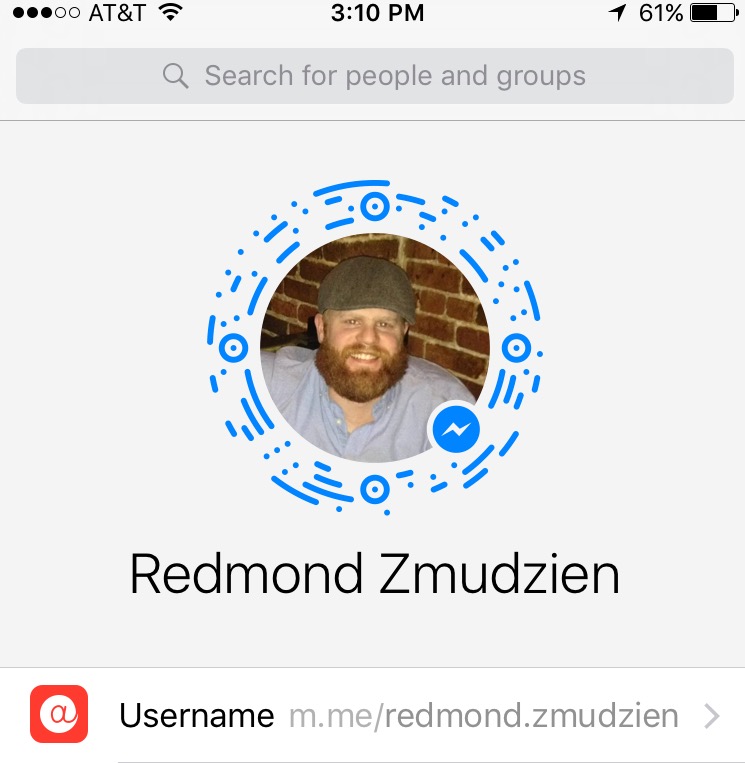
    Messenger Codes were announced and my first reaction was “QR Codes are BACK!” These are custom images unique to each Facebook business (and personal) page that, when scanned in the Messenger app will automatically open up a private message with the business page. This is a huge opportunity for engagement and customer service! Imagine the Messenger Code on the side of product packages? Get a package in the mail, but something’s not the right size? Scan the code that’s slapped on the side of the box and start having a conversation with return instructions from the business page directly in seconds. Messenger Codes may finally achieve what QR Codes so valiantly attempted in the past. These are available for download in your page’s message inbox now.

    FullSizeRender (5)

    Then there is also the recently introduced Messenger Links that use a page’s username to create a short link (think Bit.ly) that when clicked, automatically opens a private message within Messenger with the business. Try it out with your business, brand or personal page. The universal format is: m.me/PageName to get your own username.

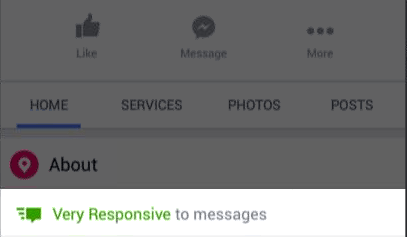
    You can also encourage conversations by being quick to respond as a corresponding badge will appear on your page while helping establish response time guidelines. You may have seen these badges popping up on more and more Facebook pages recently. The requirements consist of responding to 90% of messages within 15 minutes to receive the badge and meet the threshold of “Very Responsive.” Just remember that this threshold is only for the previous 7 day period, so if you have done this one week, but then don’t the next week, you will lose your badge.
    Screen shot 2016-05-26 at 12.37.47 PM

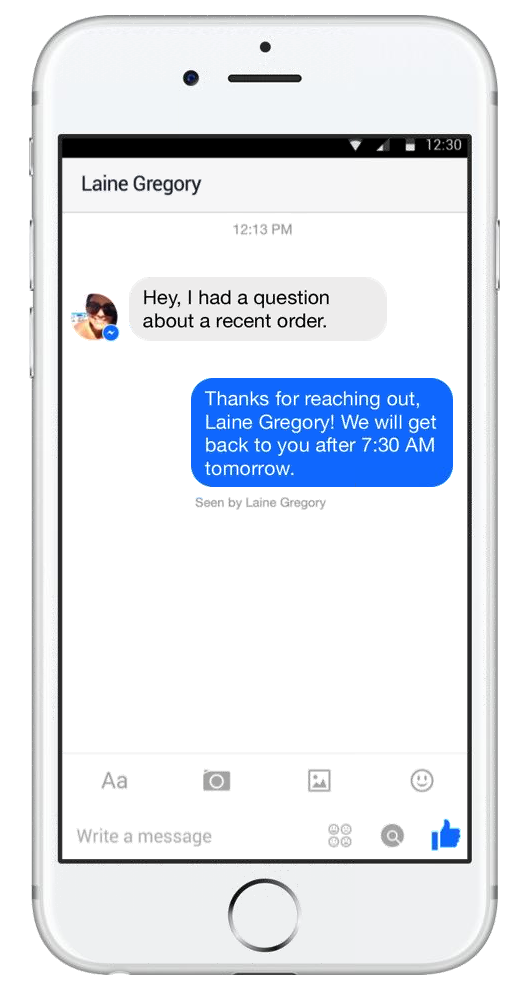
    You can also set an automatic greeting reply for when a user messages your page to set expectations and provide a link to some FAQ’s or anything else for people who start a conversation with you.

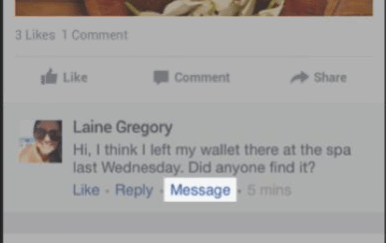
    Use the “Message” button to automatically open up a private conversation to respond to sensitive or private questions in a private message. This is a tool of unparalleled value for anyone who has ever been tasked with handling responding for a large company. Oftentimes best practices call for responding to a disgruntled customer in a private message so this helps take care of that, keeping the page drama free while also creating improved customer service.
    Screen shot 2016-05-26 at 12.40.24 PM

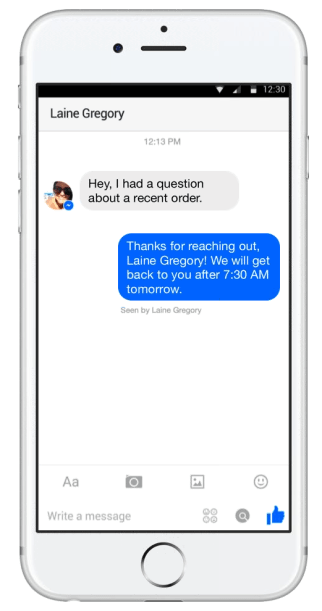
    You can also turn on Away Messages! Viva la AOL Instant Messenger! So if you’re away from the computer for a while or the business just won’t have anyone available to respond at certain hours just set this up and let your customers know exactly when you’ll get back to them. You can enable away messages even if you don’t have specific business hours too.
    Screen shot 2016-05-26 at 12.41.06 PM

    Another cool feature are Context Cards within the message inbox, which are actually a snapshot, or a trading card if you will, of the person who messaged you. These Context Cards allow a business to get more personal info on users such as where they live, where they work etc. to provide a more personalized and custom message.
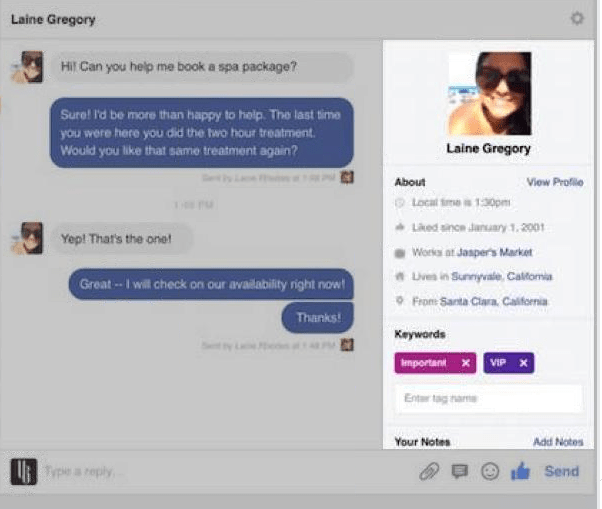
    Screen shot 2016-05-26 at 12.42.02 PM

    One thing to note for advertisers is that you can’t reach out to a customer unsolicited. So you can’t message a person who hasn’t reached out to you directly via messenger — yet. Facebook specifically said they will look into features like this in the future, but currently want to “empower customers to take the first step.” But once a person messages a page, then you can interact with them, send them special offers etc. all through Messenger.

    The best part is all of these new Facebook features are available globally right now!

  • Attack the Top of the Sales Funnel with Facebook Video

    attackthetopofthesalesfunnel

    Facebook rolls out new ad types all the time that allow advertisers to target users in unique ways or to reach different goals. Combining these various strategies into a few campaigns going through the longer sales funnel is one of the best ways to take advantage of all these ad types. This is what I like to call Attacking the Top of the Sales Funnel.

    Figure out who your key demo is for this campaign; who are you trying to hit? Is it men of a certain age in a certain radius? Moms with an interest in soccer? Whatever it is, set your targeting and run a Facebook video campaign.

    The beauty of Facebook video is you can sort out the users that are actually interested in your product based on who actually watched certain percentages of the video. Make sure to check off “Create audiences from people who view this video” under the designated Call To Action Button.

    Screen shot 2016-05-05 at 4.01.18 PM

    Doing this will allow Facebook to build a Custom Audience of users who have viewed your video. If your video gets 10,000 impressions, but only 5,000 users actually watch the video, then why would you want to waste ad spend on the 5,000 people that scrolled right past your content? Exactly, follow up with users who have already expressed an interest and given you their attention.

    Now it’s time to attack the top of the sales funnel. Using this Custom Audience you have created a perfect retargeting list to hit Facebook users with a follow up message or offer. This is particularly effective if the video is more of a brand awareness play and then retargeting users in the Custom Audience with a Carousel Ad with specific products/features.

    Finally, based on the results of your Carousel Ad determine which product or feature is getting the best engagement and most clicks from users? Then jump one level further down the funnel and closer to a conversion by serving up a specific offer or special to those users – based directly off which Carousel slide performed the best.

    Courtesy of Facebook for Business
    Courtesy of Facebook for Business

    This is a great tactic to increase efficiency of your ad spend. Rather than throwing videos, promo posts, website clicks ads etc. all out randomly and seeing what sticks, this allows you to methodically whittle down your audience size while also increasing the user attention, interest and the likelihood of ultimately making a purchase.

  • Lower the Barrier of Entry to Drive More Conversions

    Currently the average conversion on mobile takes 24 taps. This is why it is crucial to lower the barrier of entry to complete a conversion, whether that be an e-commerce purchase, a sign-up or a form fill. Making things simpler and quicker for your consumers will help improve conversion rates and total conversions. Whether it’s eliminating unnecessary steps in a shopping cart checkout process or enabling users to check out as guests, the easier the process is, the more likely consumers are to complete the desired action.

    If form fills to gather customer information is your goal, consider running a Facebook Lead Ad as it definitely lowers the barrier of entry. Rather than displaying an ad, requiring a click, sending a user to your website, waiting for it to load, manually filling out a form and then submitting it — a Lead Ad is a Two Tap process.

    Originally created as a quick way to optimize form fills for mobile users, these ads have a person click once on the ad, which will automatically fill various fields in the form based on information from their Facebook profile, and then a second click to approve and send this info to the advertiser. And with the ability to integrate these Lead Ads with CRM systems like Salesforce, this eliminates the need for a lengthy process and helps quickly grab the relevant information advertisers crave.

  • Micro Moments: Be Present, Be Personal, Be Persuasive

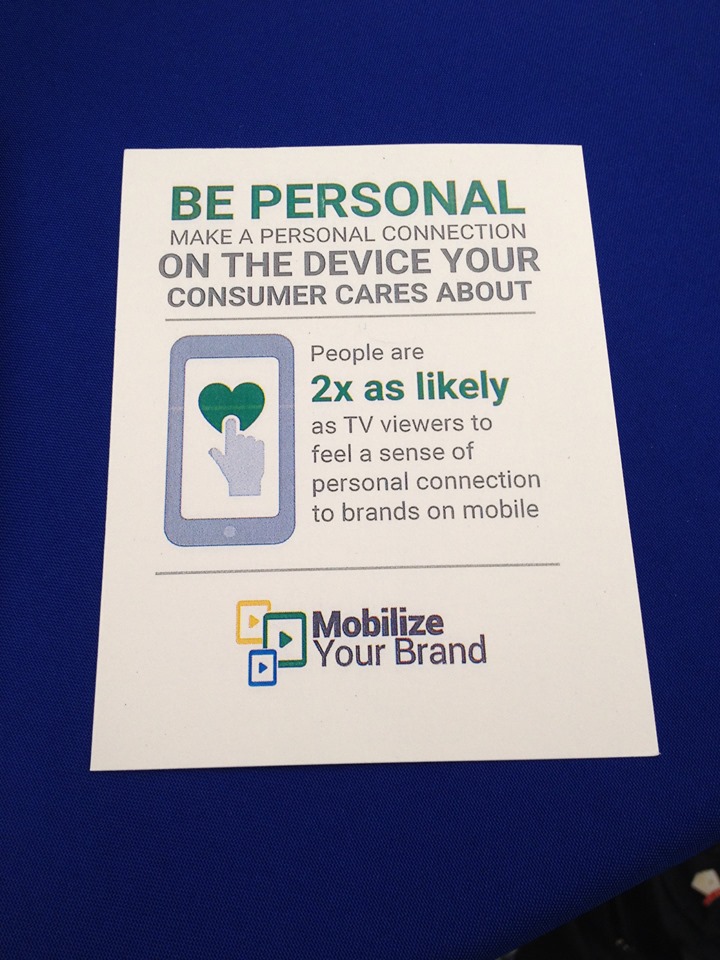
    “People are 2x as likely to feel a personal connection to brands on mobile.”

    Micro Moments  are changing the way users are searching, particularly in mobile. With the omnipresence of smartphones, users are able to search for anything when an impulse strikes, creating these “I Want to Learn, I Want to Find, I Want to Do, I Want to Buy” moments. Taking advantage of the omnipresence of mobile, users decide on the fly what they want to look up, research and purchase in the spur of the moment.

    These Micro Moments create a demand for relevance, which establishes a higher level of expectations.

    “When we act on our needs in-the-moment, our expectations are high and our patience is low. This makes the quality, relevance, and usefulness of marketing more important than ever.” – Think With Google

    google_mobile

    • Be Present, Be Personal, Be Persuasive
      • In mobile it’s all about serving the right message to the right person at the right time. Crafting a highly relevant message, that is present at the right time and optimized for the channel and device will win.
    • ⅓ of mobile usage occurs in the home so we aren’t necessarily targeting someone “on-the-go” which is why Cross Device Conversions become such a huge metric.
      • Cross Device Conversions help campaigns follow the users along the path to a conversion, regardless of where they started. If a user has a Micro Moment, performs a mobile search to learn more, but then converts later via desktop, without tracking Cross Device, we would not be able to properly attribute that.

  • Facebook Bidding Strategies: Engagement vs CPM vs CPC

    As Facebook continues to develop new ad types, selecting the right bidding strategy for each becomes even more critical. This slight adjustment in bidding strategy, whether bidding for Engagement, CPM, CPC etc. will have a huge impact on ad performance. So instead of defaulting to running a Promoted Post simply because it reaches a large number of people, it’s important to identify what the goals of an ad campaign are and act accordingly.

    A lot of times people will run Promoted Posts for sale offers and simply bid on Post Engagement (it’s the default option), which will optimize ad delivery for people most likely to engage with the post. The only problem is that this doesn’t necessarily correlate with sales as it will optimize to display ads to users most likely to comment, like, share etc. Facebook reps describe these as “clicky” users, who are more likely to comment, like or share, but not necessarily hit your website and make a purchase.


    Below are a few quick tips for your Facebook ad campaigns, depending on the goal of the ad:

    Goal: Reach a large number of users and drive Impressions

    Ad Type: Promoted Post

    Bid Strategy: CPM or Daily Unique Reach/Reach & Frequency (if you’re concerned with delivery/frequency) to blast the ad out


    Goal: Clicks to a Website

    Ad Type: Website Clicks

    Bid Strategy: CPC ­ optimized for Link Clicks

    *Note: If the audience size isn’t that large you can bid on CPC and optimize for Impressions, but Link Clicks will be the most effective way of driving results if applicable.


    ”Engagement doesn’t necessarily correlate to sales anymore.”

    • As with most things, take this with a grain of salt, but the underlying point here is that bidding on Post Engagement may not be the most effective way to drive sales. Think of it this way, if bidding on engagement you’re telling Facebook to bid on users most likely to like, comment and share where in the end what you ultimately want is people to go to the website and convert/make a purchase instead. So a Website Clicks campaign makes more sense for specific sales/offers.
      Using the Best Bid Strategy w/ Each Ad Objective
    • A Promoted Post bidding on Post Engagement would be more effective bidding for CPM if your goal is brand awareness/getting the ad in front of as many people as possible, not necessarily bidding for users who will engage on the post itself.
    • Promoted posts probably should not be used if the campaign goal is to get people to click through to the website, unless you are altering the bid strategy on that campaign to CPC (specifically Link Clicks)
    • “90% of offline sales come from people who don’t interact with the ads (likes, comments etc.)”
    • *Note: If you’re still using the old Facebook conversion tracking code, the best practice is to place the new Facebook pixel on the client website and give it 30 days to build data before switching from the old code to the new pixel.


  • Be Where Your Customers Are!

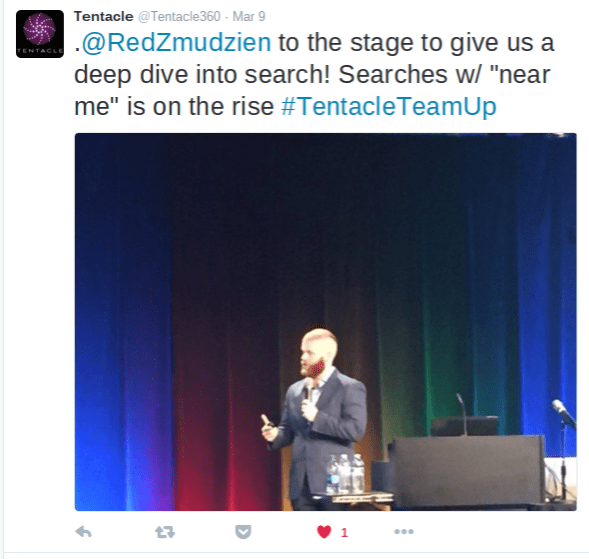
    Google searches of “near me” have doubled from 2014 – 2015 with 80% of that coming from mobile devices.

    Red Zmudzien - Tentacle Tweet


  • Reporting Facebook Conversions (Accurately)

    Confused by your conversion data on Facebook? Seeing data trickle in or maybe conversions are missing from your insights? Facebook reports all conversions as a “Conversion,” whether it’s a View Through Conversion or a Direct Conversion; Facebook does not differentiate like Google does. So that’s why it’s important to set the “Attribution Window” appropriately and leave yourself the right amount of time if trying to match up conversions with Google Analytics or a client’s CRM data. 

    How Facebook Defines Conversions:

    Facebook bundles everything into the one “Conversion” metric. The default attribution model is this:

    – User Viewed Ad and Converted Within 1 Day

    – User Clicked Ad and Converted Within 28 Days

    To adjust this, go to your Ads Manager, click on “Columns” and select “Customize Columns.”

    Facebook Customize Columns


    In the bottom right hand side of this menu you will see what the Attribution Window is currently set to with the option to adjust it.

    Facebook Attribution Window


    Set your Attribution Window appropriately, give the campaigns the same amount of time to sync up with your Analytics or client back-end system and your reporting headaches should be gone!